A programming language is more than just a means for instructing a computer to perform tasks. The language also provides us with ways to organize our descriptions of computational processes. Programs serve to communicate those ideas among the members of a programming community. The preface to the first edition of the original SICP book emphasized this point: “Programs must be written for people to read, and only incidentally for machines to execute.”
When we describe a language, we should pay particular attention to the means that the language provides for composing simple descriptions into more complex ones. Every powerful language has three such mechanisms:
primitive expressions and statements, which represent the simplest building blocks that the language provides,
means of combination, by which compound elements are built from simpler ones, and
means of abstraction, by which compound elements can be named and manipulated as units.
Programming deals primarily with two kinds of things: functions and data. (Soon we will discover that they are really not so distinct.) Informally, data is information that we want to manipulate, and functions describe the steps in manipulating the data. Thus, any powerful programming language should be able to describe data and functions, as well as have some methods for combining and abstracting both functions and data.
Expressions
We’ll start simple and build up to more interesting examples soon.
A primitive expressions doesn’t have any other expressions within it. One kind of primitive expression is a number. More precisely, the expression that you type consists of the digits that represent the number.
>>> 42
42
Expressions representing numbers may be combined with mathematical operators to form a compound expression, which the interpreter will evaluate:
>>> -1 - -1
0
>>> 1/2 + 1/4 + 1/8 + 1/16 + 1/32 + 1/64 + 1/128
0.9921875
Python includes many ways to form compound expressions. Rather than attempt to enumerate them all immediately, we will introduce new expression forms as we go, along with the language features that they support.
Call Expressions
The most important kind of compound expression is a call expression, which calls a function on some arguments. In mathematics, a function maps from input values to an output value. Similarly, in Python a function is applied to input values that are called its arguments, performs some computation, and finally returns an output value, often called its return value. For example, the max function maps its inputs to a single output, which is the largest of the inputs. A call expression has the same form as a function call in mathematics.
>>> max(7.5, 9.5)
9.5
This call expression has subexpressions: the operator is an expression that precedes parentheses, which enclose a comma-delimited list of operand expressions. [1]

The operator evaluates to the function to be called. Each operand evaluates to one of the arguments. Then, the function is applied to its arguments.
The order of the arguments in a call expression matters. For instance, the function pow raises its first argument to the power of its second argument.
>>> pow(100, 2)
10000
>>> pow(2, 100)
1267650600228229401496703205376
Function notation has three principal advantages over the mathematical convention of placing an operator such as + between two expressions, which is called infix notation. First, functions may take an arbitrary number of arguments, not just two:
>>> max(1, -2, 3, -4)
3
Second, function notation supports nested expressions, where the elements are themselves compound expressions. Unlike operators such as + and * that have order-of-operations rules that must be memorized, the order of a nested call expression is explicit in its nested parentheses.
>>> max(min(1, -2), min(pow(3, 5), -4))
-2
There is no limit (in principle) to the depth of such nesting and to the overall complexity of the expressions that the Python interpreter can evaluate. However, humans quickly get confused by deep nesting. An important role for you as a programmer is to structure expressions so that they remain interpretable by yourself, your programming partners, and other people who may read your expressions in the future.
Third, mathematical notation has a great variety of forms: multiplication appears between terms, exponents appear as superscripts, division as a horizontal bar, and a square root as a roof with slanted siding. Some of this notation is very hard to type! A convenient way to simplify all of this notation in a way that is easy to type is to express all operations as call expressions.
Importing Library Functions
Python defines a very large number of functions but does not make all of their names available by default. Instead, it organizes built-in functions into modules, which together comprise the Python Standard Library. To use these elements, one imports them. For example, the math module provides a variety of familiar mathematical functions:
>>> from math import sqrt
>>> sqrt(256)
16.0
and the operator module provides access to functions corresponding to infix operators:
>>> from operator import add, sub, mul
>>> add(14, 28)
42
>>> sub(100, mul(7, add(8, 4)))
16
An import statement designates a module name (e.g., operator or math), and then lists the named attributes of that module to import (e.g., sqrt). Once a function is imported, it can be called multiple times.
There is no difference between using these operator functions (e.g., add) and the operator symbols themselves (e.g., +).
The Python 3 Standard Library Docs list the functions defined by each module, such as the math module. However, this documentation is written for developers who know the whole language well. For now, you may find that experimenting with a function tells you more about its behavior than reading the documentation. As you become familiar with the Python language and vocabulary, this documentation will become a valuable reference source.
Names and the Environment
A core feature of a programming language is its ways of assigning names to values. If some value has been given a name, we say that the name binds to the value.
In Python, we can establish new bindings using an assignment statement, which contains a name to the left of = and a value to the right:
>>> radius = 10
>>> radius
10
>>> 2 * radius
20
Names are also bound via import statements.
>>> from math import pi
>>> pi * 71 / 223
1.0002380197528042
The = symbol is called the assignment operator in Python (and many other languages). Assignment is our simplest means of abstraction, for it allows us to use simple names to refer to the results of compound expressions, such as the area computed above. In this way, complex programs are constructed by building, step by step, data of increasing complexity.
The possibility of binding names to values and later retrieving those values by name means that the interpreter must maintain some sort of memory that keeps track of the names, values, and bindings. This memory is called an environment.
Names can also be bound to functions. For instance, the name max is bound to the max function we have been using. Functions, unlike numbers, are tricky to render as text, so Python prints an identifying description instead, when asked to describe a function:
>>> max
<built-in function max>
We can use assignment statements to give new names to existing functions.
>>> f = max
>>> f
<built-in function max>
>>> f(2, 3, 4)
4
And successive assignment statements can rebind a name to a new value.
>>> f = 2
>>> f
2
In Python, names are often called variable names or variables because they can be bound to different values in the course of executing a program. When a name is bound to a new value through assignment, it is no longer bound to any previous value. One can even bind built-in names to new values.
>>> max = 5
>>> max
5
After assigning max to 5, the name max is no longer bound to a function, and so attempting to call max(2, 3, 4) will cause an error.
When executing an assignment statement, Python evaluates the expression to the right of = before changing the binding to the name on the left. Therefore, one can refer to a name in right-side expression, even if it is the name to be bound by the assignment statement.
>>> x = 2
>>> x = x + 1
>>> x
3
We can also assign multiple values to multiple names in a single statement, where names on the left of = and expressions on the right of = are separated by commas.
>>> area, circumference = pi * radius * radius, 2 * pi * radius
>>> area
314.1592653589793
>>> circumference
62.83185307179586
Changing the value of one name does not affect other names. Below, even though the name area was bound to a value defined originally in terms of radius, the value of area has not changed. Updating the value of area requires another assignment statement.
>>> radius = 11
>>> area
314.1592653589793
>>> area = pi * radius * radius
>>> area
380.1327110843649
With multiple assignment, all expressions to the right of = are evaluated before any names to the left are bound to those values. As a result of this rule, swapping the values bound to two names can be performed in a single statement.
>>> x, y = 3, 4.5
>>> y, x = x, y
>>> x
4.5
>>> y
3
Evaluating Nested Expressions
The process of evaluating expressions is itself a computational procedure that we can describe as a sequence of steps. For example, in evaluating nested call expressions, the interpreter is following this procedure:
Evaluate the operator and operand subexpressions, then
Apply the function that is the value of the operator subexpression to the arguments that are the values of the operand subexpressions.
Even this simple procedure illustrates some important points about processes in general. The first step dictates that in order to accomplish the evaluation process for a call expression we must first evaluate other expressions. Thus, the evaluation procedure is recursive in nature; that is, it includes, as one of its steps, the need to invoke the rule itself.
For example, evaluating
>>> mul(add(2, mul(4, 6)), add(3, 5))
208
requires that this evaluation procedure be applied four times. If we draw each expression that we evaluate, we can visualize the hierarchical structure of this process.
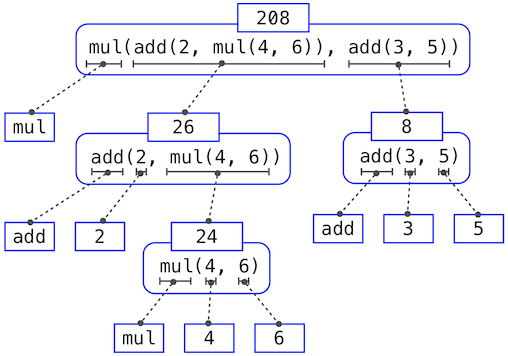
This illustration is called an expression tree. Each position within the tree is an expression paired with its values.
Evaluating the full expression at the top requires first evaluating the subexpressions below it. The bottom expressions are primitive expressions that evaluate to either functions or numbers. Viewing evaluation in terms of this tree, we can imagine that the values of the operands percolate upward, starting from the primitive expressions at the bottom and then combining at higher and higher levels.
Next, observe that the repeated application of the first step brings us to the point where we need to evaluate, not call expressions, but primitive expressions such as numerals (e.g., 2) and names (e.g., add). We take care of the primitive cases by stipulating that
A numeral evaluates[2] to the number it names,
A (variable) name evaluates to the value bound to that name in the current environment.
Notice the important role of an environment in determining the values of the symbols in expressions. In Python, it is meaningless to speak of the value of an expression such as
>>> add(x, 1)without specifying any information about the environment that would provide a value for the name x (or even for the name add). Environments provide the context in which evaluation takes place, which plays an important role in our understanding of program execution.
This evaluation procedure does not suffice to evaluate all Python code, only call expressions, numerals, and names. For instance, it does not handle assignment statements. Executing
>>> x = 3does not return a value nor apply a function to some arguments, since the purpose of assignment is instead to bind a name to a value. Statements are not evaluated but executed; they do not produce a value but instead make some change. Each type of expression or statement has its own evaluation or execution procedure.
The Non-Pure Print Function
Throughout this text, we will distinguish between two types of functions.
Pure functions. These are functions have some input (their arguments) and return some output (the result of applying them), and that’s it. Pure functions may perform computation, but what makes them pure is that they don’t have any other impact on the program or computer besides providing their return value and always return the same value each time they are called on the same arguments.
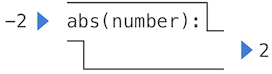
The built-in function abs, which computes and returns the absolute value of its argument, is an example.
>>> abs(-2)
2
It can be depicted as a small machine that takes input and produces output.
Non-pure functions. In addition to returning a value, applying a non-pure function can generate side effects, which make some change to the state of the interpreter or computer. A common side effect is to generate output on the screen. The print function does this.
>>> print(1, 2, 3)
1 2 3
While print and abs may appear to be similar in these examples, they work in fundamentally different ways. The value that print returns is always None, a special Python value that represents nothing. The interactive Python interpreter does not automatically print the value None. In the case of print, the function itself is printing output as a side effect of being called.
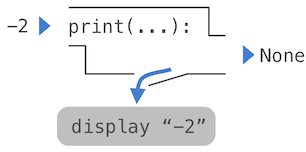
Assigning the return value to a name shows the difference.
>>> x = abs(-3)
>>> print(x)
3
>>> y = print(-3)
-3
>>> print(y)
None
Because print does not return its argument, the result of calling print can’t be used in some more complicated expression. For example, while abs(-3) * 2 is 6 because abs(-3) returns 3, print(-3) * 2 causes an error because print(-3) returns None, which can’t be multiplied by 2.
A nested expression of calls to print is an interesting case to study. Each call to print displays one line, and calling print on the return value of a call to print displays None.
>>> print(print(1), print(2))
1
2
None None
If you find this output to be unexpected, draw an expression tree to clarify why evaluating this expression produces this peculiar output.
Pure functions are restricted in that they cannot have side effects or change behavior over time. Imposing these restrictions yields substantial benefits. First, pure functions can be composed reliably into compound call expressions. We have seen that functions such as max, pow and sqrt can be used effectively in nested expressions.
Pure functions have other advantages, such as making complex programs easier to understand and more predictable, as well as allowing multiple functions to be applied concurrently.
For these reasons, we concentrate heavily on creating and using pure functions in the remainder of this chapter. Non-pure functions will be discussed at length in Chapter 2.
The official Python language reference uses different terminology to describe the parts of call expressions. Rather than operator, the expression before parentheses is called the primary (or sometimes just the function). Rather than operand, the expressions within parentheses are called argument expressions. This text uses the more classic operator and operand terms because they can help distinguish between expressions (which are code) and values (which are data).
A pedantic note: when we say that some expression evaluates to a value, we actually mean that the Python interpreter evaluates a numeral to a number. It is the interpreter that endows meaning to the programming language by running programs. Since the interpreter is a fixed program that always behaves consistently, it’s natural to talk about what expressions evaluate to what values in the context of Python programs.